
Download Taskbar Hide – hide windows, minimize to system tray, taskbar hide, system tray, window management, productivity tool, desktop organization
Overview
Taskbar Hide — это лёгкий инструмент повышения продуктивности, разработанный для улучшения организации рабочего стола, предоставляющий пользователям больший контроль над видимостью окон и присутствием панели задач. Приложение позволяет полностью скрывать запущенные программы или сворачивать их в область уведомлений, уменьшая визуальный беспорядок и создавая более чистое, сфокусированное рабочее пространство. Это особенно полезно для профессионалов, удалённых сотрудников и людей, которые одновременно работают с несколькими программами и ценят среду без отвлечений. Инструмент поддерживает настраиваемые горячие клавиши для мгновенного скрытия окон, позволяя быстро очистить экран во время презентаций, приватных сессий работы или при переключении между задачами. Он также предоставляет возможность скрывать системные элементы, такие как панель задач, кнопку «Пуск», область уведомлений и часы, обеспечивая полноэкранный или минималистичный интерфейс. Хотя разработчик не предоставил дополнительных технических деталей, Taskbar Hide доступен с 2015 года, что свидетельствует о стабильном и длительном присутствии в экосистеме Windows‑продуктивности. Его основная функциональность остаётся актуальной для пользователей, ищущих эффективное управление окнами без нагрузки сложного программного обеспечения. Приложение служит практичной утилитой для всех, кто стремится поддерживать визуальный порядок, сохраняя доступ к необходимым программам.
Key Features & Functionality
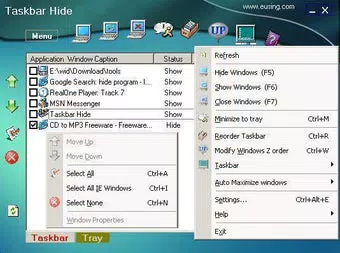
- Hide Windows with Hotkeys: Users can assign custom keyboard shortcuts to instantly hide any active window. This feature supports quick access to a clean desktop, ideal for privacy or rapid task switching.
- Minimize to System Tray: Instead of occupying the taskbar, applications can be minimized directly to the system tray, preserving screen space and reducing interface noise.
- Customize Icon and Title: The tool allows users to modify the icon and title of any window, enabling personalized labeling for easier identification among open programs.
- Control Window Behavior: Users can set applications to always stay on top or adjust their minimizing and maximizing behavior, offering enhanced control over window dynamics.
- Hide Taskbar and Tray Items: Beyond individual windows, Taskbar Hide enables users to hide the taskbar, Start button, system tray, and clock, creating a distraction-free or immersive workspace.
These features are especially useful in scenarios such as content creation, multitasking during meetings, or working in shared environments where visual privacy is essential. For example, a user preparing a confidential report can hide all open windows with a single key combination. Similarly, a designer working on a full-screen project can hide the taskbar and clock to maintain focus. The tool’s lightweight nature ensures minimal system impact, making it suitable for use across a range of Windows devices.
Interface, UX & Performance
Taskbar Hide features a minimal and straightforward interface, consistent with its utility-focused design. The application runs in the background with a small system tray icon, ensuring it does not interfere with the user’s workflow. Navigation is intuitive, relying primarily on context menus and keyboard shortcuts rather than complex menus or onboarding.
Users can access settings through the system tray icon, where options for hotkey assignment, window behavior, and visibility controls are available. The UI is clean and functional, with no unnecessary visual elements, aligning with the app’s goal of reducing desktop clutter. Although the developer did not list formal performance metrics, the application’s file size of 2.3 MB suggests a lightweight footprint, likely resulting in low memory usage and fast startup times.
It is expected to perform reliably on various Windows device categories, including desktops, laptops, and older systems. Responsiveness is maintained through efficient handling of window events, and stability is implied by the app’s long-standing release history. No reports of crashes or conflicts were provided, though users should exercise caution when hiding system-level components.
Platform Compatibility & Technical Requirements
Taskbar Hide is designed exclusively for the Windows operating system. It is compatible with Windows platforms, though specific OS versions were not listed by the developer. The application has a file size of 2.3 MB, making it suitable for devices with limited storage.
The software version is 1.0.0, released on July 21, 2015. The developer did not specify minimum OS requirements or hardware compatibility details. As such, users should verify compatibility with their current Windows installation before installation.
The app is available at no cost, with no in-app purchases or subscription models. While it has not been updated since its initial release, its continued availability suggests it remains functional on modern Windows systems. Users seeking the latest version should check official sources for potential updates or patches.
Pros and Cons
Pros
- Free to download and use with no hidden costs
- Lightweight file size (2.3 MB) ensures minimal system impact
- Supports customizable hotkeys for instant window hiding
- Allows hiding of taskbar, Start button, system tray, and clock
- Simple, intuitive interface with minimal learning curve
Cons
- Developer did not provide information on minimum OS requirements
- No recent updates since 2015, raising concerns about long-term compatibility
- Compatibility with newer Windows versions has not been confirmed
- Limited documentation or user support resources available
- No cloud sync or cross-device functionality
FAQ
Is Taskbar Hide safe to download and install?
Yes, the app is free and available from official sources. However, users should ensure they download it from trusted platforms to avoid bundled software or malware.
Can I use Taskbar Hide on Windows 10 or Windows 11?
While the developer did not specify compatibility with specific Windows versions, the app has been in use since 2015 and may function on newer systems. Users are advised to test it on their device before full reliance.
Does Taskbar Hide require administrator rights?
The developer did not disclose permission requirements. It is recommended to install the app with standard user privileges unless prompted otherwise.
Can I hide the taskbar permanently?
Yes, Taskbar Hide allows users to hide the taskbar, Start button, system tray, and clock. This setting can be toggled on or off as needed.
Is there a mobile version of Taskbar Hide?
Taskbar Hide is a Windows desktop application. There is no mobile version available for Android or iOS at this time.
Final Thoughts
Taskbar Hide remains a niche yet effective utility for users who prioritize desktop cleanliness and control. Its ability to hide windows, minimize to the system tray, and conceal core system elements makes it a valuable tool for professionals and power users alike. Despite its age and lack of recent updates, the app continues to deliver on its core promise: a streamlined, distraction-free workspace.
The absence of ads, in-app purchases, or complex features adds to its appeal. While compatibility with newer Windows versions is unconfirmed, many users may still find it functional and reliable. For those seeking a lightweight, no-cost solution to manage their desktop environment, Taskbar Hide offers a straightforward and effective approach.
Download Taskbar Hide now to reclaim your screen space and elevate your productivity.


